Build Agent
This action opens a configuration window that allows you to generate an installation package for a Discovery Agent.
| 1. | In the main window, click Admin > Discovery > Client. |
| 2. | Select the applicable client. A new window opens with the Details tab displayed. |
| 3. | Click the Discovery Agents tab. |
| 4. | From the Select Actions drop-down list, choose Build Agent. The Build Agent dialog box displays.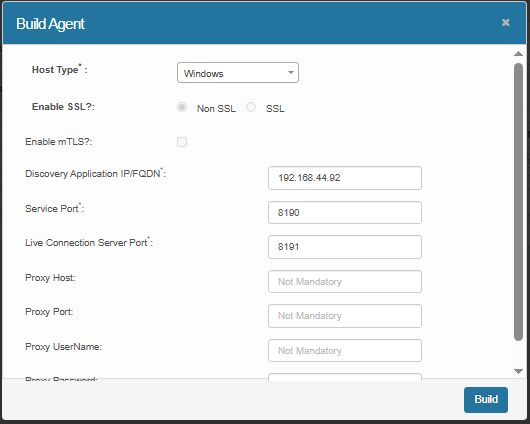 |
| 5. | Select the Host Type (Windows or Linux). |
| 6. | Define the required network details: |
Enable SSL? → choose Non SSL or SSL (per your environment).
(Optional) Enable mTLS? → check if your deployment requires mutual TLS.
Discovery Application IP/FQDN*: enter the Client/Discovery server address (e.g., 192.168.44.106). Service Port*: enter the app
service port (example shown: 8190).
Live Connection Server Port*: enter the live/command channel port (example shown: 8191).
Proxy Host / Port / Username / Password: fill these if the agent must reach the server via a proxy.
| 7. | Click Build. |