Import Templates
The Import Templates page serves as the central location where predefined templates for Configuration Item (CI) data imports are managed and displayed. These templates act as structured formats that guide users in preparing data files for uploading assets into the Configuration Management Database (CMDB).
Use this function to view the data as provided on an imported Excel spreadsheet.
| You cannot modify this information. |
| 1. | On the main window, click Admin > Discovery > Import Templates. The Import Templates window displays. |
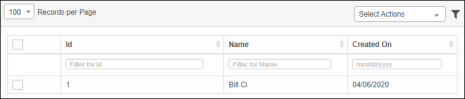
| 2. | Column description: Id: Unique template identifier Name: Template name (e.g., "Azure VMs", "Stg Srvr") Created On: Date of creation. |
| 3. | From the Select Actions drop-down list, choose either Delete or Export. |
Other Functions and Page Elements