Configuration Items (CI)
Configuration Items (CI) are components or other service assets must be managed to deliver an IT service.
In Virima:
Each CI is derived from a Blueprint, with components that can be Network Adapters, Storage Disks, Software Instances, and so forth.
Each CI component is associated with the parent CI using Relationships--for example, Installed On, Component Of, Hosted On, Virtualized On, and so forth.
Each CI/CI Component in Ecosystem Manager has a unique Asset ID.
CI's are added when they are:
Moved manually into CMDB.
Discovered by the Discovery application as they are moved into CMDB.
Imported from a file (.xls, .xlsx, or .csv).
To configure items, do the following:
| 1. | In the navigation pane, select ITSM > Configuration Management > Configuration Items. The Configuration Items window displays. |
| 2. | In the navigation pane, select ITAM > Configuration Management > CMDB. The Configuration Items window displays. |
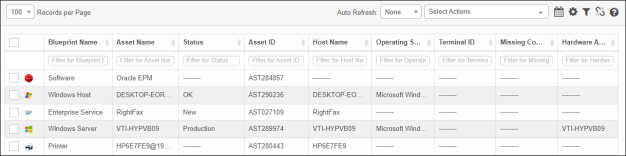

| 3. | From the Select Actions drop-down list, choose an action: New, Delete, or Export. |
| 4. | From the Select Actions drop-down list, choose any of the following actions: |
Change Attributes. Changes the properties of single or multiple CIs. The attributes change based on the type of CI selected. Refer to Components.
Process Actions. Refer to CMDB Process Jobs.
Related Topics
Other Functions and Page Elements